
Rush Tiles: Rhythm Music Piano
iMusic GameMusic
4.08.00 Reviews
- Version
- 1.0.32
- Installs
- 1.00M
- Age Rating
- Everyone
Screenshots




Our Review of Rush Tiles: Rhythm Music Piano
 Analysis by Appyee
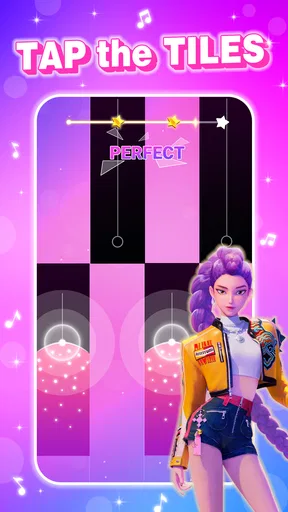
I spent time with Rush Tiles: Rhythm Music Piano as a quick-play music game, and my overall impression is clear: it is best understood as a focused test of timing and finger speed rather than a full rhythm-game experience. The appeal is immediate. You see piano-style tiles, react to the beat or visual movement, and try to keep your hands accurate while the pace demands more attention.
That simplicity is also the reason it works. I can open it for a short break without learning a complicated system, building a character, or working through a long tutorial. At the same time, players looking for deep music customization, a broad competitive scene, or the richer presentation of a premium rhythm game may find it limited. My recommendation is therefore specific: this is a good free choice for people who enjoy reflex challenges and piano-tile gameplay, but it should not be mistaken for a complete musical instrument app or an expansive rhythm adventure.
How the piano-tile challenge feels in everyday play
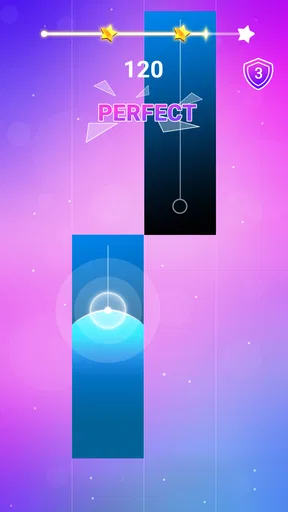
The central interaction is easy to understand, but it is not always easy to execute. The screen asks me to keep my attention on the incoming tiles and respond with quick, controlled taps. Early moments feel approachable because the rules are readable almost immediately. The challenge comes from maintaining accuracy once the visual flow becomes faster and hesitation starts to create a chain of mistakes.
I particularly like that the game turns a very small action into a concentration exercise. A single tap feels insignificant, yet a sequence of correct taps requires rhythm, visual tracking, and hand positioning at the same time. That combination makes each attempt more engaging than a simple button-mashing game. I am not merely tapping as quickly as possible; I am trying to anticipate the next movement without losing the current one.
In practice, I found it most enjoyable in short sessions. For example, if I have a few minutes before leaving home, I can play a round, notice where my timing broke down, and try again with a calmer hand. It also fits the kind of casual play I might use after work when I want something active enough to hold my attention but not demanding enough to require a long commitment.
The game’s strongest quality is its low barrier to entry. The store presents it as a piano game centered on testing finger speed, and that description is accurate without telling the whole story. The real test is not speed alone. Fast tapping without control quickly becomes counterproductive, so I get better results by keeping my eyes slightly ahead of my fingers and avoiding unnecessary movement.
Why the simple controls create a real skill curve
One useful technique is to treat each attempt as a timing exercise rather than a race. When I focus only on going faster, my taps become tense and I start reacting late. When I concentrate on a steady visual rhythm, my hands feel more consistent. This is a small distinction, but it changes how the game feels: improvement comes from control and attention, not just frantic movement.
Another practical habit is to use the same hand position between attempts. Constantly shifting the phone or changing where my fingers rest makes the screen feel less predictable. Holding it comfortably and keeping my tapping area stable gives me a better chance of recognizing patterns. This is especially helpful for players who normally struggle with reflex games because of rushed movements rather than genuinely slow reactions.
I also recommend playing with a clear screen and a comfortable grip. That may sound obvious, but a tile game depends on visual clarity and precise contact. A crowded environment, glare, or an awkward one-handed grip can make the challenge feel unfair even when the real problem is how the phone is being held. The game is simple enough that small physical distractions have a noticeable effect.
There is a worthwhile trade-off here. Because the interaction is so direct, every mistake feels personal. I cannot blame a complicated control scheme when I miss; the game makes it obvious that my timing slipped. That honesty can be motivating for someone who enjoys improving through repetition, but it can also become frustrating for anyone who wants a relaxed game with little pressure.
What separates it from a music player or piano-learning tool
Although the presentation is built around piano imagery, I would not use this as a substitute for learning piano. It trains quick reactions and visual timing, not posture, note reading, finger independence in a traditional musical sense, or expressive playing. Someone wanting structured lessons should choose an educational piano application instead.
It is also different from simply listening to music. The player has an active role, and the enjoyment comes from matching attention and touch to the moving challenge. That makes the experience more engaging than passive listening for a short break, but it also means I cannot treat it as background entertainment. If I look away, the game immediately becomes harder to follow.
Compared with larger rhythm games, the attraction is its directness. Many alternatives add elaborate menus, collectible systems, character progression, story content, or a wide range of modes. Those features can create more long-term variety, but they also add preparation time. Here, the core activity is much easier to reach. I can concentrate on the tile sequence instead of managing a larger game ecosystem.
The disadvantage of that approach is equally clear. Players who enjoy unlocking content, customizing a profile, or comparing a detailed collection of songs may prefer a more feature-heavy rhythm title. This game’s appeal depends on whether the act of repeating a reflex challenge is enough to keep you interested. For me, it works best when I want a compact skill test, not when I am searching for a long-form music game.
Performance, accessibility, and practical expectations
Rush Tiles: Rhythm Music Piano is a free game from iMusic Game, with an Everyone content rating. It runs on Android devices using Android 8.0 or newer, which makes it accessible to many people who do not own the newest phone. The current version is 1.0.31, and the game has reached over a million installs, so it is not an obscure experiment with no visible audience.
The public response is positive but not flawless. It holds a four-point average from around one thousand ratings, which suggests that many players find the basic idea enjoyable while leaving room for individual differences in expectations. I would interpret that rating carefully: a simple reflex game can be satisfying to one person and repetitive to another, even when both understand how it works.
The game was released on August 25, 2024, and that context matters when setting expectations. I approach it as a relatively focused mobile title rather than a mature platform with years of accumulated content. That does not make it a poor choice, but it does reinforce my advice to judge it by the quality of its central tapping challenge instead of expecting the breadth of a long-established rhythm franchise.
One question many players will have is whether it is suitable for children. The Everyone rating makes it broadly approachable from an age-classification perspective, and the straightforward controls are easy to understand. Still, the pace may be more comfortable for older children and adults who already enjoy quick reactions. Younger players may need help holding the device securely and may become frustrated if they expect the piano theme to behave like a real learning tool.
Another practical question is whether it is worth trying when you only have occasional free time. In my experience, yes, provided you enjoy repetition. The game does not require a large time investment to understand, and a short session can still feel complete. The important qualification is that its replay value comes from trying to perform better, not from a promise of a constantly changing activity.
The meaningful weakness: repetition can arrive quickly
The biggest limitation is not the control idea itself; it is the narrowness of that idea. Once I understand the tile-tapping loop, the main source of variety is the changing challenge and my own performance. That can be enough for players who like score chasing and gradual improvement, but it may not satisfy someone who needs new objectives, story progression, or a strong sense of discovery.
This also affects how I recommend using it. I would not plan an entire evening around the game unless I already knew that I enjoy repeating reflex challenges. Instead, I see it as a reliable small activity: something to play between tasks, during a short wait, or when I want to wake up my concentration. Its compact design is a strength in that setting and a weakness when treated as a primary entertainment game.
There is a second kind of friction in the relationship between speed and accuracy. The game invites fast fingers, but speed can encourage poor technique. If I tense my hand or tap without watching carefully, I lose consistency. Players with sensitive touch habits may need a short adjustment period, especially if they normally play slower puzzle games where precision is less time-critical.
For the best experience, I would start with brief attempts and stop before frustration turns into careless tapping. Taking a short pause after a poor run helps more than immediately repeating the same mistake. I also find it useful to identify whether the problem was visual tracking, hand position, or rushing. That makes each retry more purposeful and turns the game into a small practice routine instead of an endless loop of annoyance.
People who want a completely calm experience should probably skip it. The piano theme may sound soothing, but the actual play can become tense when the sequence accelerates. Likewise, anyone who needs a game with extensive accessibility options, detailed learning guidance, or a substantial offline-style progression system should investigate alternatives designed around those priorities rather than choosing this one for its theme alone.
Who will get the most from it
I think the best audience is made up of casual players who enjoy music-themed games, quick reaction tests, and uncomplicated controls. It is also a reasonable pick for someone who has never tried a piano-tile game and wants to understand the format without committing to a paid purchase. Since the game is free, the barrier to experimenting is low.
It may also suit players who like measuring personal improvement. The most rewarding moments for me came after recognizing why an attempt failed and then staying calmer on the next run. That creates a modest but genuine skill loop. The game does not need a complicated progression system to provide that satisfaction, because the challenge is visible in the player’s own consistency.
It is less suitable for people who want musical creativity. I cannot treat the tile layout as a keyboard for freely playing melodies, and I would not recommend it to someone hoping to practice songs in a traditional way. A dedicated piano-learning app is the better option for lessons, while a larger rhythm game is likely preferable for players who want more content and variety.
It is also worth considering your tolerance for repeated attempts. If you enjoy retrying a short challenge until your reactions improve, the compact design is convenient. If you usually need a new level, narrative development, or a changing objective to stay interested, the same design may feel thin. That is the central choice: immediate skill practice versus broader game depth.
My final verdict on the mobile piano challenge
After playing it as both a quick distraction and a focused reflex exercise, I see Rush Tiles: Rhythm Music Piano as a straightforward game with a clearly defined purpose. It makes tapping feel like a small musical performance, but its real strength is the demand for visual attention and controlled finger speed. The controls are easy to grasp, yet improving at them requires patience rather than random rapid tapping.
The free price and Everyone rating make it easy to recommend as a low-risk trial, particularly for casual Android players using Android 8.0 or later. Its audience is already substantial, with more than a million installs, and the four-point average from roughly one thousand ratings reflects a generally favorable response without suggesting universal appeal.
My honest reservation is longevity. The game’s focused loop can become repetitive if personal improvement is not enough motivation. I would choose a broader rhythm title for a longer gaming session, a learning app for actual piano study, and a music player for passive listening. Those alternatives serve different goals, and this game is strongest when its narrower purpose matches what I want.
My recommendation is to try it when you want a free, quick, and hands-on timing challenge. Keep your grip steady, prioritize accuracy over frantic speed, and treat each attempt as practice. If that kind of small improvement loop sounds satisfying, this game can make short breaks surprisingly engaging. If you are searching for deep progression or genuine piano instruction, it is better to look elsewhere.
Privacy and Permissions
See what permissions an app requests and how it handles your data.
- Wi-Fi connection information
- view Wi-Fi connections
- Other
- view network connections, full network access, control vibration, prevent device from sleeping, Google Play license check
Verdict
Strengths of Rush Tiles: Rhythm Music Piano
- Simple tap controls make it easy to start playing immediately.
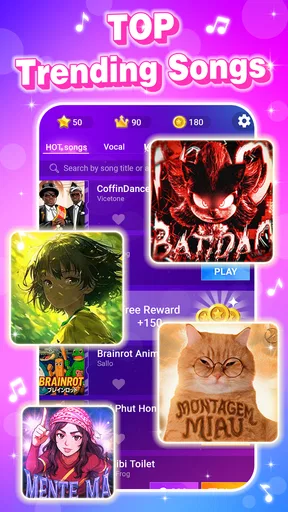
- Large song library offers plenty of tracks to try.
- Fast rounds are ideal for short gaming sessions.
- Increasing speed keeps later levels challenging and engaging.
- Bright visuals and rhythmic effects make gameplay satisfying.
Limitations of Rush Tiles: Rhythm Music Piano
- Some songs and features may require in-app purchases.
- Ads can interrupt the experience between gameplay sessions.
- Difficulty spikes may frustrate players seeking a relaxed game.
- Requires precise timing, especially on faster songs.
- Gameplay can feel repetitive after extended sessions.
Similar Picks in This Category
View All
Tiles Hop Music & Ball Game
AMANOTES PTE. LTD.4.3

Magic Tiles 3™ - Piano Game
AMANOTES PTE. LTD.4.6

Real Piano
Bilkon3.7

Piano Game: Classic Music Song
Dream Tiles Piano Game Studio4.0

Smash Colors: Music Ball Rush
BADSNOWBALL HONGKONG LIMITED4.2

Piano Music Go-EDM Piano Games
Joy Journey Music Games4.5
Frequently Asked Questions
What is Rush Tiles: Rhythm Music Piano?
Rush Tiles: Rhythm Music Piano is a fast-paced rhythm game in which you tap, hold, and follow piano tiles in time with the music. The main challenge is maintaining accuracy while the patterns become quicker and more complex. It is designed for short play sessions, but the increasing difficulty, score chasing, and song progression can make it surprisingly addictive for players who enjoy reflex-based music games.
Can I play Rush Tiles: Rhythm Music Piano offline?
The game may allow some gameplay without a constant internet connection, particularly after its basic content has loaded, which is useful when traveling or playing without mobile data. However, online access can still be required for advertisements, new song content, account-related features, leaderboards, or synchronization. Availability may also vary by device and version, so checking the current store description is recommended before downloading.
Is Rush Tiles: Rhythm Music Piano free to download and play?
Rush Tiles: Rhythm Music Piano is generally offered as a free download, allowing players to try its core mechanics without an upfront purchase. Like many mobile rhythm games, it may include advertising, optional purchases, or systems that limit certain content and attempts. Before installing, review the in-app purchase information carefully, especially if the game will be used by children or on a shared device.
What kind of music and gameplay difficulty does it offer?
The game focuses on piano-style tracks and rhythm patterns that require quick reactions rather than traditional piano knowledge. Early stages are usually approachable for beginners, while later sections demand better timing, concentration, and finger speed. The experience is best suited to players who enjoy repeating levels to improve accuracy, unlock more content, and achieve higher scores instead of expecting a full piano-learning application.
What devices are compatible with Rush Tiles: Rhythm Music Piano?
Compatibility depends on the version available through the Google Play Store or Apple App Store, as well as your device’s operating system and hardware. Most recent Android and iOS phones should handle a lightweight rhythm game smoothly, but older devices may experience slower performance, touch-response issues, or limited support. Always check the listed requirements, permissions, ratings, and latest update date before downloading.
Play our best games!


